
Access control for any building, from a single door to many sites

Every door decides on site. Even when the internet is down.

Vamitor Client runs in your building and talks directly to your door controllers. Vamitor Cloud lets you manage people, rules, visitors and sites from anywhere, without opening a single port.

  • Works offline
  • No open ports
  • Every decision explained
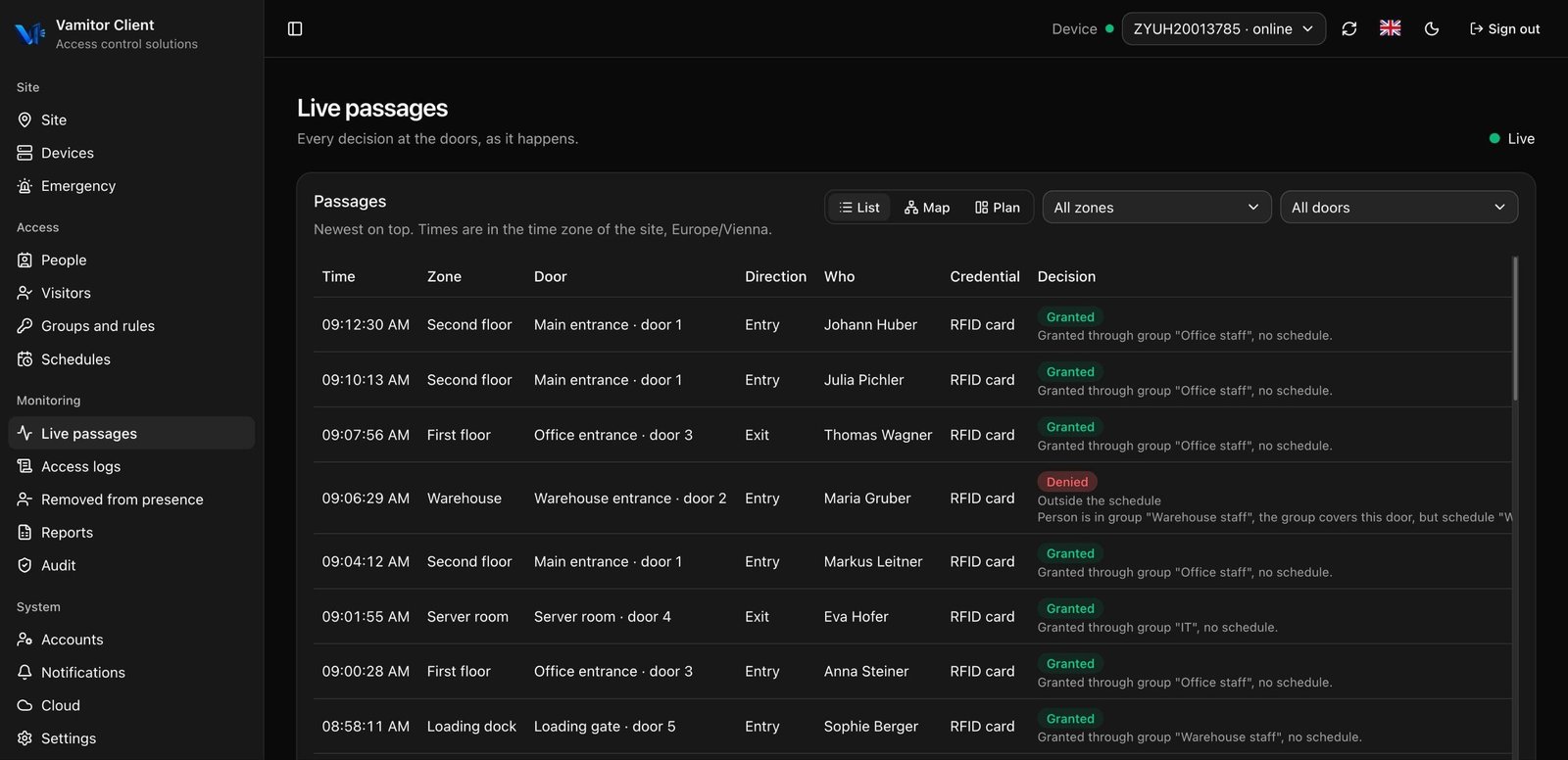
Live passages in Vamitor Client
06:52:14Denied
Johann Huber · RFID card
Warehouse entrance · door 2 · Warehouse · Entry

No rule allows this doorPerson is in group "Warehouse staff", the group covers this door, but schedule "Warehouse shift" was not active at 06:52.

Products

Everything for access control, from one supplier

Software that runs in the cloud, in your building and on your phone, and hardware tested to work with it.

Software

Manage access in the browser, on site or from your phone.

In the cloud

Vamitor Cloud

Manage every site from one console in the browser. People, rules, visitors, reports and audit, without opening a single port in the building.

  • All sites in one place
  • Roles per site and two-factor sign-in
  • Remote unlock and lockdown
On site

Vamitor Client

The server in your building. It talks to the controllers and decides at every door, with or without internet.

  • Windows or Linux
  • Keeps working without internet
  • Setup wizard and automatic database backups
Setup tool

Vamitor Netconfig

Gets new controllers ready for installation. Connect over USB or the network, set the address and the server, and the controller is ready.

  • Connects over USB or the network
  • Network settings and server address
  • Made for installers
On your phone

Vamitor Mobile

Access control in your pocket. See who is inside, get alerts and open a door remotely.

  • Live passages and alerts
  • Remote unlock
  • For administrators and security staff
Hardware

Controllers and readers we test with Vamitor, so everything works from day one.

Door controllers

The link between the server and the door. Readers, locks, exit buttons and door contacts connect to them.

RFID readers

Read cards and key fobs at the entry and the exit.

Fingerprint readers

Entry without a card, with a fingerprint.

QR code readers

For visitors and one-time entry, with a QR code on paper or a phone.

Cards and key fobs

RFID cards and fobs for staff and visitors, ready to be assigned.

Not sure what you need? Tell us about your building and we will put together the software and hardware for it.

Talk to us
How it works

The cloud manages. The building decides.

Most cloud access systems ask the internet before they open a door. Vamitor does not. The server on site holds a copy of everything it needs and decides by itself.

1

Vamitor Client talks to your controllers

It runs on a small Windows or Linux server in the building and connects directly to the readers and controllers at each door.

2

Decisions happen on site

Cards, PINs, groups, schedules and holidays are kept locally. If the internet or the cloud is unavailable, doors keep working on the last valid rules.

3

The cloud is optional, and safe

Vamitor Client opens one encrypted outgoing connection with mutual TLS. Changes made in the cloud are sent to the building right away, and events from the building reach the cloud once the connection is back.

Screens

Vamitor Client at work

The same screens your team uses every day, in the browser on site.

Live passages in Vamitor Client

Every passage as it happens, with the person, the door and the decision.

Features

Everything a building needs at the door

From the first card to the yearly audit, in one system.

People and cards

Employees, contractors and residents with RFID cards and PINs. Read a new card straight from a reader, or import people from a CSV file.

Groups, rules and schedules

Give a group access to zones or single doors at set times. Holiday calendars for different countries, and individual allow or deny rules with a reason.

Visitors

Invite by email, hand out a card at reception, and let the visit end on its own. Access stops when the visit is over.

Live activity and who is inside

Every entry and exit as it happens, with a plain explanation of why someone was let in or turned away.

Remote unlock and lockdown

Open a door from the cloud or lock down a whole site, always with a role, a reason and a record. Free exit is never blocked.

Tamper-evident audit log

Every change by every admin is chained, so a removed or edited entry shows up. Passwords and secrets are never written to the log.

Reports

Access and presence reports as CSV, Excel or PDF, on demand or sent by email every day, week or month.

Notifications

Email and webhook alerts for the events you care about, such as an unknown card at a door or a controller that went offline.

Health and backups

Controllers, disk, database and backups are checked all the time. Automatic database backups on the schedule you set.

Two ways to run

Start local. Add the cloud when you need it.

Both run the same decision engine, so a door behaves the same way either way.

Vamitor Client on its own

For a single building that wants everything on its own network.

  • People, groups, schedules, visitors and reports in the browser on site
  • Local accounts with roles
  • Setup wizard, new or existing database

With Vamitor Cloud

For companies with several sites, or anyone who manages access from outside the building.

  • All sites in one console, roles per site
  • Two-factor sign-in for administrators
  • Remote unlock, lockdown and central audit

When you pair a site with the cloud later, its people, cards, groups, schedules and visitors are transferred, and the local data stays where it is.

Plans

Pay once for the building, monthly for the cloud

The cloud is priced by sites and doors, not by the number of people.

One-time license

Local

Vamitor Client for one site, licensed once.

  • Decisions at every door, offline
  • People, rules, visitors and reports
  • Windows or Linux
Request a quote
Yearly subscription

Support & Maintenance

Updates and help when you need it.

  • Updates and security fixes
  • Technical support with agreed response times
  • Help with server upgrades
Request a quote

Hardware, installation and custom integrations are quoted separately. Larger systems with an SLA: ask us for an offer.

FAQ

Questions we hear most

What happens when the internet goes down?

Nothing changes at the doors. Vamitor Client decides with its local copy of the rules. Administrators on site can still sign in, and events are sent to the cloud as soon as the connection is back.

Do I need to open ports on my network?

No. Vamitor Client opens one encrypted outgoing connection to the cloud. Nothing from the internet connects into your network.

Which controllers and readers are supported?

Vamitor works with network door controllers that use RFID cards and PINs. Tell us which hardware you have and we will confirm before you buy.

Can I start without the cloud and add it later?

Yes. Run Vamitor Client on its own, and pair it with Vamitor Cloud whenever you want. Your data is transferred during pairing.

Who can unlock a door remotely?

Only accounts whose role allows it, for the sites they are assigned to. Every remote command needs a reason and is written to the audit log.

See Vamitor on your own doors

Tell us how many sites and doors you have. We will show you a demo and send you an offer.

sales@vamitor.com